
IT integrations
IT System Integration for Engineering & Manufacturing

CONFIG2, developed by Scandinavian Digital, is an advanced solution that simplifies complex configuration tasks through its Symbolic AI engine, delivering precise and organized results. It integrates smoothly with CPQ, CRM, PLM/PDM, and ERP systems, allowing users to generate and visualize detailed product models without the need for external CAD software. This solution ensures seamless data alignment across sales, product management, and order fulfillment, offering a fully comprehensive, end-to-end system.
IT integration is rarely the goal in itself. It is what makes the rest hold together: a configuration from CPQ that reaches ERP, a bill of materials from design automation that lands in production, and supplier data that stays current. Our team has delivered more than 200 complex CAD automation solutions across SOLIDWORKS, Autodesk Inventor and PTC Creo.
What IT integration means in a configure-to-order business
In a configure-to-order or engineer-to-order business, no single system owns the product. Sales owns the quote, engineering owns the model and the rules, production owns the bill of materials, and finance owns the order. IT integration is the work of making those views of the same product agree with each other without anyone retyping anything.
The practical test is simple: when a salesperson changes one option in a configuration, how many systems have to be touched by hand before the shop floor can build it? In a business without integration the answer is three or four. In an integrated one it is none. The configuration is the single input, and the quote, the drawing set, the bill of materials and the production order are all derived from it.
That is why we treat integration as part of the configurator project and not as an IT task that comes afterwards. A configurator that cannot write its result into ERP produces a document, not an order. It is the same argument we make about design automation: the value is not in the model that is generated, it is in the model arriving where the next person needs it.
A full integration map
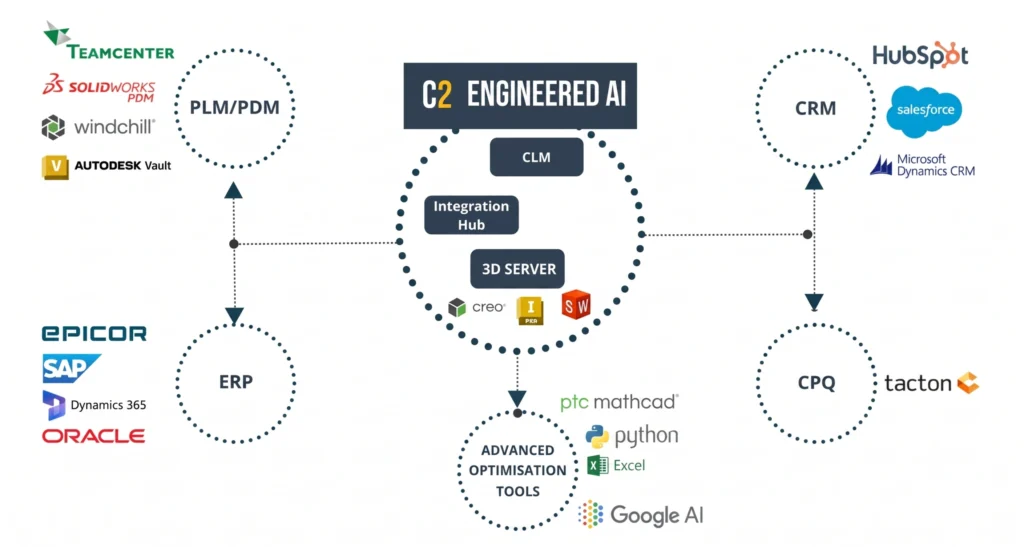
Hover over a circle to see the systems we integrate withTap a circle to see the systems we integrate with
The systems a configurator has to talk to
Four categories cover almost every project we take on.
PLM and PDM. The product data system holds the released models, the item numbers and the revision history. The configurator reads structure and revisions from it, and writes generated models and drawings back under controlled revisions, so an automatically generated variant is governed by the same release process as one built by hand.
ERP. This is where a configuration becomes a cost and a plan: bill of materials, routing, purchase requirements and the order itself. The integration has to deliver a bill of materials that ERP can actually explode, which in practice means agreeing on item numbering and on how a configured, non-stocked item is represented before a single line of code is written.
CRM and CPQ. The commercial side needs the price, the option list and the quote, and it needs them to survive revisions. When a customer asks for a third version of a quote, the version that is finally won has to be the one that reaches production. CPQ is the layer where that happens, whether it runs on Tacton or on CONFIG2.
CAD. CONFIG2 generates and visualises detailed product models without requiring a CAD seat for the person configuring, and writes native files for the CAD systems engineering already uses.
A fifth category turns up in most projects once the first four are running: the systems outside your own company. That is supplier integration, and it follows the same rules.
| System | What it gives the configurator | What the configurator gives it | The usual sticking point |
|---|---|---|---|
| PLM / PDM | Released models, item numbers, revision state | Generated models and drawings under controlled revisions | Whether a generated variant needs its own released item, or inherits one |
| ERP | Item master, cost data, stock and lead times | Bill of materials, routing, purchase requirements, the order | How a configured, non-stocked item is numbered and represented |
| CRM / CPQ | Customer, opportunity, pricing conditions | Valid configuration, price, option list, quote document | Keeping quote revisions aligned so the won version is the one built |
| CAD | Geometry, templates, parametric rules | Native files and drawings for the variant that was sold | Which system owns a dimension once the configurator can set it |
Download the CONFIG 2 product sheet
Read more about our tool in the CONFIG 2 Product Sheet. The challenge, the solution, the key features and benefits, the key use cases, user-interface, integrations compatibility and technical specifications.
Watch
A CPQ demo featuring TACTON and CONFIG2, with the focus on document generation
In the video you will watch a CPQ demo featuring TACTON and CONFIG2, with the focus on document generation.
How an integration runs in practice
Every integration we build goes through the same steps, and the order matters more than the technology.
1. Map the fields, not the systems. We list every field that has to cross a boundary and name the one system that owns it. Two systems holding the same field with equal authority is the most common reason an integration works in testing and drifts in production.
2. Agree how a configured item is identified. This single decision shapes the rest of the project. Get it wrong and every later question, from costing to spare parts, has to be answered twice.
3. Build one slice end to end. One real product, one real order, all the way from configuration to a production order in ERP, before anything is widened. A thin slice that works is worth more than four half-finished interfaces.
4. Widen by product family. Each family brings its own exceptions. Taking them one at a time keeps the exceptions visible instead of letting them accumulate into a rule nobody can explain.
5. Hand over with monitoring. An integration without a visible error queue is an integration nobody notices has stopped. The people who will maintain it need to see failures the same day they happen.
Which integration method we choose
We are not religious about the method. Most of our work uses an API where the target system has a usable one, a watched file exchange where it does not, and an integration platform where several systems already meet in one place. The choice follows the customer’s IT landscape and the people who will maintain it after we leave, not our preference.
What matters is that the interface is documented, versioned and testable. A configurator lives for ten years or more, and at least one of the systems around it will be replaced in that time. An integration built so it can be pointed at a new ERP is worth considerably more than one built quickly.
If you want to see what the finished result looks like before discussing your own landscape, the demo library shows configuration, pricing and document generation running together, and you are welcome to get in touch with the specifics of your setup.
IT integration: frequently asked questions
No. CONFIG2 is built to integrate with the CPQ, CRM, PLM/PDM and ERP systems you already run. The configurator becomes the layer that keeps them consistent, not a replacement for any of them.
No. CONFIG2 generates and visualises detailed product models without an external CAD seat, so sales and other non-engineering users can configure and see the result. Native CAD files are still produced for the engineers who need them.
That is the point of the mapping work at the start. We agree on item numbering and on how a configured, non-stocked item is represented before anything is built, because a bill of materials ERP cannot explode is not an integration, it is a report.
It depends on how many systems are involved and how clean the item data is, and the honest answer is that data quality decides it more often than technology does. We work in slices, so the first product family is usually running long before the full scope is finished.
Interfaces are documented and versioned so an upgrade becomes a known piece of work rather than a surprise. This is also why we hand over with monitoring in place: a change on either side shows up as a visible error rather than as silently missing data.
You do, and we make sure that is realistic. Documentation, the error queue and the field mapping are handed over to the people who will maintain it, and we stay available for the changes that follow a new product family.